
All-in-one workspace for research and creation Eden lets users save posts, links, and notes from platforms like YouTube, X, Threads, LinkedIn, Instagram, TikTok, and Substack, then chat with that saved material, outline ideas, and draft full pieces — all without switching between a separate bookmarking app, a notes app, and a writing tool.
Auto-organization without manual filing Every saved link, post, or note gets tagged and categorized automatically, and related ideas get connected to each other over time, so users aren't stuck building and maintaining their own folder structure.
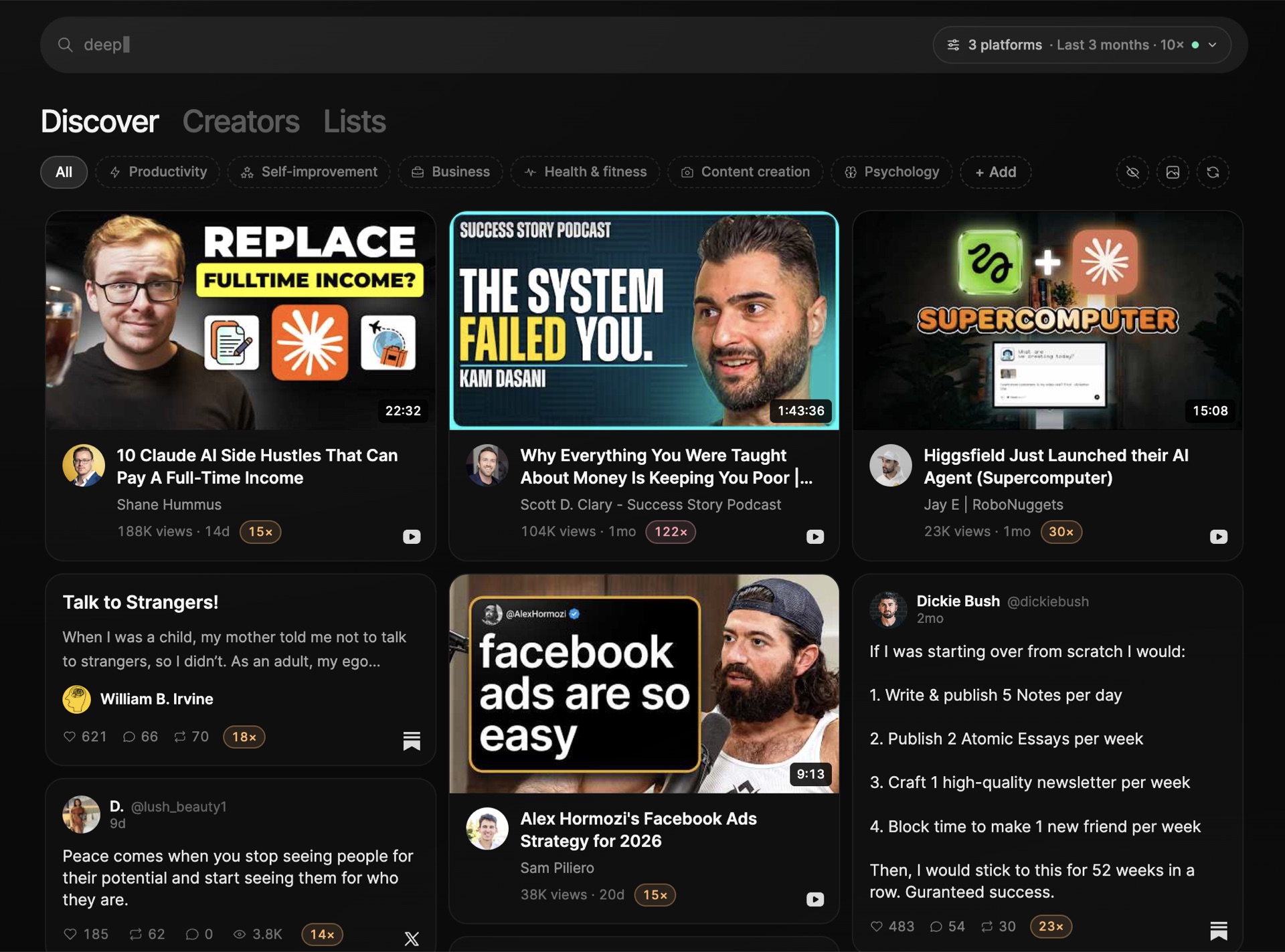
Genuine trend and creator research The Discover feature lets users search for high-performing posts by topic, format, or platform, and study a specific creator's top posts, hooks, and formats. This goes beyond generic content prompts by grounding suggestions in real, currently-performing examples.
AI that learns a personal voice over time Eden builds what it calls an "identity" — a map of a user's worldview, voice, craft, audience, and influences — which its AI assistant, Eve, draws on when generating hooks, angles, or drafts, rather than producing generic AI-sounding copy.
Useful content transformation tools Features like reverse-engineering a post's structure (hook, beats, payoff) and applying it to a new idea, or turning one saved post into a full week of content variations, address a real pain point: staring at a blank page despite having plenty of raw inspiration saved.
Scheduling across major platforms Eden can queue and publish a week of posts across X, Threads, YouTube Shorts, Instagram, TikTok, LinkedIn, Facebook, and Substack, meaning users don't need a separate scheduling tool once content is drafted.
Agent connectivity through MCP Eden can connect directly to Claude, ChatGPT, or other AI agents via MCP, letting users research top-performing posts, get creator breakdowns, or draft content straight from an external AI assistant instead of switching into the Eden interface.
Steeper learning curve than a single-purpose tool Because Eden combines saving, research, writing, and scheduling into one system, new users may need time to understand how boards, chats, and the discovery feed all fit together, compared to a simple bookmarking app or a basic scheduler.
Overlaps with tools people may already use Eden's comparison pages against tools like Readwise, Raindrop.io, Obsidian, Buffer, and Hootsuite suggest it's competing across several categories at once. Users who already have a favorite note-taking app or scheduler may find some functionality redundant unless they're ready to consolidate.
Value depends on consistent use Features like the "identity" that shapes AI writing and the auto-connected ideas depend on a user regularly saving and interacting with content. Someone who uses it sporadically may not get the same benefit as someone who treats it as a daily workspace.
Primarily built around social content creators The feature set — swipe files, creator research, outlier discovery, multi-platform scheduling — is clearly optimized for people building an audience on social media. Users with different content needs, like long-form technical writing unrelated to social platforms, may find less value in several of its core features.
Eden's biggest strength is tying research, writing, and publishing together in one place instead of leaving users to manually move ideas between a bookmarking app, a notes tool, and a scheduler. The tradeoff is a system with more moving parts than a single-purpose tool, which pays off mainly for people who create content regularly enough to make the auto-organization and personalized AI writing worth the setup.
You can try Eden for yourself here to see if it fits your content workflow.