
Taking notes sounds simple until you are trying to listen, participate in a conversation, remember important details, and write everything down at the same time.
HeyPocket approaches that problem with a dedicated AI recording device called Pocket.
Instead of relying entirely on your phone, Pocket is a small physical recorder designed to capture conversations, meetings, phone calls, and spoken ideas. After recording, its software can turn the audio into transcripts, summaries, action items, mind maps, and searchable information.
After reviewing HeyPocket’s official product specifications, AI features, pricing structure, FAQ, shipping information, warranty, returns, and privacy documentation, here is a closer look at what Pocket offers and where it may fit best.
Pocket is a compact hardware device built specifically around recording and organizing spoken information.
Starting a recording is intentionally simple.
Press the side button once and Pocket begins recording. A light indicator and vibration confirm that recording has started. Press the button again when you are finished.
Once the recording is synced to the Pocket app, the system can generate:
That makes Pocket less like a traditional voice recorder and more like a physical input device for an AI note-taking system.
Instead of recording something and manually listening to the entire file later, the idea is to turn spoken conversations into structured information that can be reviewed much more quickly.
Portability is one of Pocket’s biggest advantages.
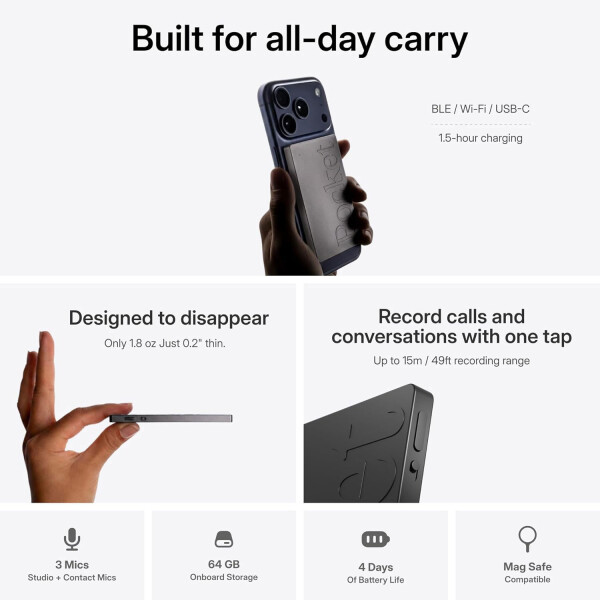
The device measures approximately 3.4 × 2.2 × 0.2 inches and weighs about 52 grams.
That makes it roughly credit-card sized and considerably easier to carry than most traditional recording equipment.
Pocket is also MagSafe-compatible, allowing it to attach magnetically to compatible smartphones.
You do not necessarily need a MagSafe phone to use it, however. HeyPocket says non-MagSafe phones can use an optional adhesive mounting solution.
For meetings or in-person conversations, Pocket can simply sit nearby rather than remaining attached to a phone.
The compact form factor makes the device suitable for everyday carrying in a pocket, bag, laptop case, or workspace.
Pocket uses three microphones:
The two conventional microphones are intended to capture conversations and voices in the surrounding environment.
The contact microphone adds another useful capability: recording phone calls without forcing the call through the phone’s external speaker.
According to HeyPocket, the device can record from distances of up to approximately 15 meters or 49 feet, although actual performance naturally depends on the surrounding environment.
This gives Pocket flexibility across different situations, including individual voice notes, small meetings, larger rooms, interviews, and phone conversations.
Recording audio is only half of Pocket’s value.
The more important part is what happens afterward.
Pocket can automatically transform recordings into structured summaries so you do not necessarily have to replay an entire conversation to find the important parts.
Its free feature set currently includes several summary styles, while Pocket Pro expands the selection substantially.
This can be particularly useful after longer meetings.
Instead of working through an hour of audio, you can review the transcript, summary, action items, and other generated information first and return to the recording when additional context is needed.
For people who attend many meetings each week, this workflow could save considerably more time than a conventional recorder.
One of the more interesting software features is Ask Pocket.
Rather than treating every recording as an isolated file, Pocket Pro allows users to ask questions about information contained in their recordings.
For example, someone could potentially look back through previous conversations to find:
This changes the value of the recording archive.
Instead of functioning only as stored audio, previous conversations become a searchable knowledge base.
The usefulness of this feature naturally depends on how much you record and how accurately the relevant information was captured, but the concept is one of the strongest reasons to use an AI recorder instead of a basic voice recorder.
HeyPocket currently states that its platform supports more than 120 languages.
That is especially useful for international users, multilingual meetings, remote teams, interviews, travel, and businesses working across several markets.
The platform can generate transcripts and AI-generated outputs from supported recordings without requiring users to maintain separate recording tools for different languages.
For people who regularly communicate across regions, language support can be just as important as the physical recorder itself.
Pocket does not require continuous internet access while recording.
The device contains 64GB of onboard storage and can record while offline.
Once an internet connection becomes available again, recordings can sync through the Pocket app to the company’s cloud infrastructure.
This is an important practical advantage.
Meetings do not always happen somewhere with stable Wi-Fi, and relying entirely on a cloud-connected recording app can create problems when the connection disappears.
Pocket separates the recording stage from the synchronization and AI-processing stage.
That allows the hardware to continue capturing audio even when connectivity is temporarily unavailable.
HeyPocket rates Pocket for up to four days of active use on a charge.
Charging takes approximately 1.5 hours and is handled through USB-C.
Actual battery life will naturally depend on how frequently the device is used, but the multi-day rating means it should not need to be charged after every individual meeting.
For someone carrying Pocket between work, meetings, interviews, classes, or travel, that is considerably more practical than a device requiring constant charging.
One thing buyers should understand before purchasing is that Pocket has both free and paid software features.
A subscription is not required simply to use the hardware.
HeyPocket currently says the free tier includes unlimited transcription and its core features.
The free feature set includes things such as:
Pocket Pro adds the more advanced AI capabilities.
According to the current official product page, Pro includes features such as:
At the time of this review, HeyPocket lists Pocket Pro at $19.99 per month after the introductory period.
Pricing and bundled offers can change, so the checkout page should always be checked before buying.
Pocket includes 64GB of storage directly on the device.
That allows recordings to remain locally available before synchronization.
The company also provides cloud storage through the Pocket platform.
This combination gives the device an advantage over tools that depend entirely on a smartphone or an immediate internet connection.
HeyPocket says recordings synced to the cloud remain associated with the user’s Pocket account, making them accessible from compatible devices after signing in.
Cloud-history limits depend on whether the account is using the free or Pro feature set.
Pocket is not limited to a single phone platform.
HeyPocket says it works with both iOS and Android, and the company also provides access through desktop and web applications.
That broader ecosystem matters because recorded information may be easier to review on a laptop than on a small phone screen.
You might capture a meeting with the physical device, sync it through the mobile app, then review or export the resulting notes later from a desktop environment.
This device-plus-software approach is a large part of what differentiates Pocket from a standalone digital recorder.
Any product designed to record conversations inevitably raises privacy questions.
HeyPocket states that Pocket uses encrypted storage and secure cloud synchronization.
The company also publishes a separate Privacy Policy explaining the categories of information it collects, how that information is used, and when information may be disclosed.
Users should read those policies rather than relying entirely on short marketing statements about security.
There is another issue that is just as important: recording laws.
Rules about recording conversations vary between countries, states, and jurisdictions.
Depending on where you are located, you may need consent from one participant, every participant, or may be subject to additional restrictions.
Pocket makes recording extremely easy, but that does not remove the user’s responsibility to follow applicable laws and workplace policies.
HeyPocket currently ships beyond the United States.
Its official FAQ lists supported markets across North America, Europe, Asia-Pacific, and the Middle East.
Current destinations include markets such as:
along with several additional European and Middle Eastern countries.
HeyPocket currently estimates U.S. deliveries at approximately three to five business days, while international deliveries generally take around a week.
These are estimates rather than guaranteed delivery dates, and international customers may also be responsible for duties, taxes, VAT, customs fees, or brokerage charges depending on destination.
Pocket purchased directly through the company currently comes with a 30-day return window from the carrier-confirmed delivery date.
Returns require proof of purchase and the product must generally be returned in like-new condition with its original packaging, components, and accessories.
Customers also need to obtain a Return Merchandise Authorization before sending the device back.
Pocket hardware carries a one-year limited warranty covering defects in materials and workmanship under normal use.
For a valid warranty issue, the company may repair the device, replace it with a new or refurbished unit, or provide a refund when repair or replacement is not commercially reasonable.
As with most hardware warranties, accidental damage, misuse, normal cosmetic wear, unauthorized modifications, and certain other situations are excluded.
The hardware is genuinely compact.
At roughly credit-card size and only 52 grams, Pocket is easier to carry continuously than traditional recording equipment.
Phone-call recording is built into the hardware.
The dedicated contact microphone gives Pocket a different use case from apps that simply listen through the phone’s speaker.
Offline recording is practical.
The 64GB onboard storage means you do not need a constant internet connection just to capture a conversation.
The AI features go beyond transcription.
Summaries, action items, mind maps, speaker separation, and Ask Pocket make the system more useful than simply turning speech into text.
The free tier is meaningful.
A subscription is not mandatory for basic use, and HeyPocket currently includes unlimited transcription among its core free features.
The device works across multiple platforms.
iOS, Android, web, and desktop support make the system easier to fit into an existing workflow.
Some of the best AI features require Pocket Pro.
Ask Pocket, advanced speaker separation, expanded summary formats, unlimited cloud history, and several other capabilities sit behind the paid subscription.
That means the total long-term cost can be higher if those features become an essential part of your workflow.
Check current pricing rather than relying on an old promotion.
HeyPocket runs different offers and landing pages, so hardware pricing, introductory subscription periods, and discounts may change.
Recording laws still apply.
Pocket makes it technically easy to record conversations, but users remain responsible for obtaining any consent required by local law.
AI-generated notes should still be reviewed when accuracy matters.
Transcription and summaries can save time, but important names, figures, commitments, legal details, medical information, or financial information should be checked against the original conversation.
Cloud-based AI introduces a privacy consideration.
Anyone recording sensitive business or personal discussions should review HeyPocket’s Privacy Policy and their own organization’s data-security requirements before using the service.
HeyPocket is most compelling for people who spend a significant portion of their day in conversations.
Meetings, client calls, interviews, lectures, brainstorming sessions, voice notes, and spontaneous ideas all produce information that is easy to forget once the conversation ends.
Pocket creates a simple workflow around that problem:
press a button, record the conversation, let the device sync, and then review structured AI-generated information instead of manually reconstructing what happened.
Its strongest advantage is the combination of dedicated hardware and AI software.
A smartphone app can record audio, and many software tools can transcribe meetings, but Pocket packages recording, phone-call capture, offline storage, transcription, summaries, action items, mind maps, and searchable conversation history into one small device.
The free tier also means buyers do not necessarily have to maintain a subscription simply to keep using the basic recorder and transcription functionality.
Pocket Pro becomes more relevant for heavy users who want advanced AI search, speaker separation, expanded summaries, and unlimited cloud history.
It will not be necessary for everyone.
Someone who records only a few short meetings each month may be perfectly happy using an existing phone or computer.
But for professionals, founders, sales teams, consultants, recruiters, students, journalists, researchers, or anyone who repeatedly finds themselves thinking “I wish I had written that down,” Pocket offers an interesting alternative to traditional note-taking.