

Anyone running more than one computer off the same monitors knows the frustration of a basic KVM switch that can't keep up — dropped EDID handshakes, laggy switching, or a complete lack of support for high-refresh gaming displays. TESmart has spent over two decades building specifically toward solving that problem at a genuinely professional level, offering KVM switches supporting up to 8K60Hz and 4K144Hz across everything from simple 2-PC setups to 16-port enterprise configurations. After going through their full catalog, buying tools, and standout models, here's a complete breakdown to help you find the right switch for your actual desk.
TESmart builds professional KVM solutions specifically for multi-monitor, high-refresh, Mac, PC, and hybrid workstation setups — the exact scenarios where basic consumer-grade KVM switches typically fall short.
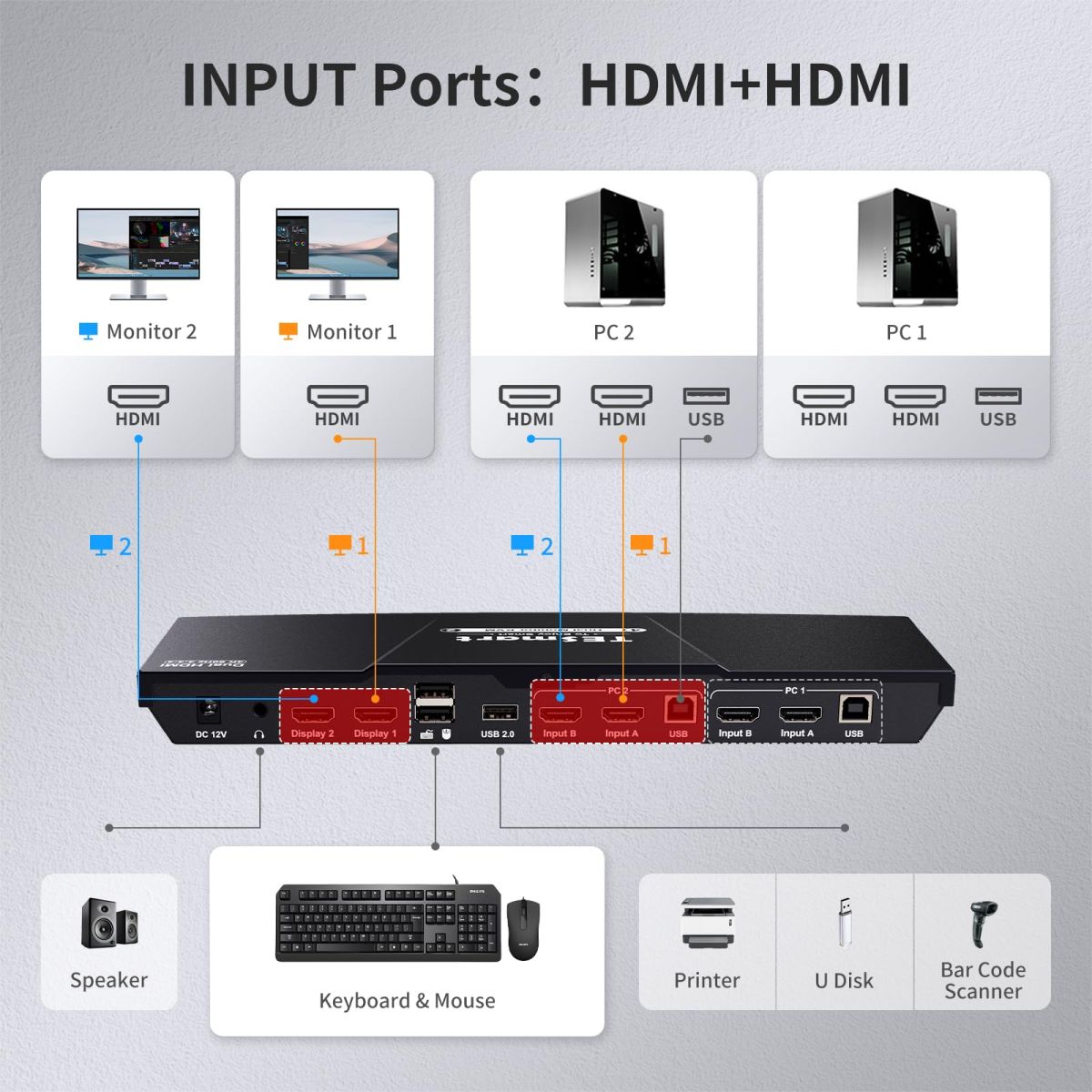
This is a genuinely deep catalog — organized by number of computers (2, 4, 8, or 16 PCs), by number of monitors (1 through 4+), by connection type (HDMI 2.1, DisplayPort 1.4, Thunderbolt 4, USB-C), and by use case (gaming, IT/office, hybrid work, Apple Studio Display compatibility). With over 50 distinct models, this multi-axis structure is genuinely necessary rather than excessive.
DKS202-M24 (from $329.90, 179 reviews, 5.0/5). The brand's clear flagship best-seller — dual 8K60Hz/4K144Hz DisplayPort 1.4 switching with G-Sync and FreeSync variable refresh rate support, genuinely rare in a KVM switch category where VRR pass-through has historically been a weak point.
DKS203-M24 (from $429.90, 102 reviews, 4.98/5). The triple-monitor version of the same core technology, extending VRR gaming support across three displays simultaneously.
HKS401-M23 (from $329.99, 62 reviews, 4.97/5). A 4-port single-monitor switch, well-suited to gamers or professionals cycling between four separate machines on one primary display.
TKS202-X4 and THK401-X4 (from $699-$799). Purpose-built specifically for Apple Studio Display compatibility over Thunderbolt 4, supporting up to 6K@60Hz or 5K@120Hz — addressing a genuinely specific, underserved need for Mac users wanting to share a premium display across multiple machines.
HDC203-PM24 (from $699, 8 reviews, 5.0/5) and HDC203-P24 (from $599.90, 4 reviews, 5.0/5). Triple-monitor hybrid docks specifically designed for a mixed laptop-and-desktop setup, supporting both DisplayLink and MST multi-stream technology depending on the model — genuinely useful for hybrid workers who regularly switch between a work laptop and a personal desktop on the same monitor array.
HDK802-M24 ($1,199) and HKS1601-M24 ($959). Supporting 8 and 16 connected PCs respectively, these sit at the top of the catalog for IT professionals and studios needing to manage a genuinely large number of machines from one control point.
KVM Finder. A guided questionnaire tool that walks through your specific computer count, monitor count, port types, and target resolution to recommend a matching model — a real time-saver given how specific compatibility requirements can get in this category.
"Check My Setup" Direct Verification. Beyond the automated finder, TESmart offers to have their team directly verify compatibility if you send your specific computer and monitor models — a genuinely reassuring option before committing to a higher-priced multi-monitor unit.
Side-by-Side Model Comparison and Combined Listings. Letting customers compare specs directly across models rather than relying on marketing copy alone.
Up to 50% Trade-In Credit. A genuinely substantial trade-in program letting customers offset the cost of upgrading from an older KVM switch (TESmart's own or otherwise).
Extended 1+4 Year Warranty via Registration. Registering a purchase unlocks four additional years of coverage beyond the standard term — a meaningfully strong long-term ownership commitment for electronics in this category.
Public "Built With Users" Feedback Loop. Genuinely notable transparency — TESmart publicly documents specific user-reported issues (like cursor behavior crossing into an inactive display during mixed-screen use) and how that feedback shaped subsequent product design. Publishing an actual example of a real bug report driving a real design change is a meaningfully honest practice most electronics brands avoid.
Genuinely rare VRR (variable refresh rate) pass-through in a KVM switch. G-Sync and FreeSync support across multiple models addresses a real technical gap that has historically made KVM switches a poor fit for PC gaming setups specifically.
A remarkably deep, well-organized catalog for a specific technical category. Being able to filter by computer count, monitor count, connection type, and use case simultaneously reflects genuine investment in helping customers navigate 50+ distinct models without guessing.
Real, substantial review volume on flagship models. With the DKS202-M24 alone carrying 179 reviews at a 5.0 average, there's strong evidence of sustained customer satisfaction on the brand's most popular unit.
Genuinely useful pre-purchase compatibility verification. Offering direct, human compatibility checking before you buy is a meaningfully reassuring option in a product category where an incompatible purchase is a genuine frustration.
A substantial trade-in and extended warranty structure. The combination of up to 50% trade-in credit and a registration-unlocked 1+4 year warranty reflects real, long-term customer relationship investment.
Rare public transparency about product development driven by user feedback. Documenting a specific real bug report and its resolution is a genuinely uncommon level of openness for a hardware brand.
KVM compatibility depends on precise technical matching, not just port type. Given how specific requirements can be (exact resolution, refresh rate, EDID handling, VRR support), it's worth using the KVil Finder tool or the direct "Check My Setup" verification rather than assuming a port match alone guarantees full compatibility with your specific monitors and GPUs.
Higher-tier multi-monitor and enterprise units represent a genuine investment. With flagship hybrid docks and enterprise switches reaching $700-$1,200+, it's worth confirming your specific use case actually needs that level of monitor count and connection complexity before stepping up from a more affordable dual-monitor option.
Review counts vary significantly across the catalog's 50+ models. Since some newer or more specialized models show limited reviews compared to established best-sellers like the DKS202-M24, it's worth weighing that when considering a newer or more niche unit.
Register your product promptly to activate the extended warranty. Since the additional 4 years of coverage requires registration rather than being automatic, it's worth completing that step soon after purchase to make sure you're covered long-term.
Trade-in credit values and eligibility should be confirmed directly. Since trade-in terms can vary by model and condition, it's worth reviewing the specific policy for your old unit before assuming the full advertised discount applies.
If you're running multiple computers into shared monitors — especially in a gaming, hybrid work, or professional multi-display setup — TESmart offers a remarkably deep, technically serious KVM lineup worth exploring. The combination of genuinely rare VRR gaming support, a well-organized catalog spanning 50+ models, substantial review validation on flagship units, real pre-purchase compatibility verification, and a strong trade-in and extended warranty structure makes it easy to find hardware that actually keeps up with a complex modern desk setup — just use the KVM Finder or direct compatibility check before buying, given how specific the technical requirements in this category can get.
👉 Shop the full TESmart KVM switch and docking station collection here